


How to register, buy and sell cryptocurrency via the world’s first social-infused trading exchange - XT.COM
Founded in 2018, XT.COM, the world’s first social-infused trading platform, now serves more than 6 million registered users and has over 500,000+ monthly active users and 40+ million users in the ecosystem. Covering a rich variety of trading categories along with an NFT aggregated marketplace, XT.COM strives to cater to its large user base by providing a secure, trusted and intuitive trading experience.

Content:
1. Registration & Verification
2. How to do Spot Trading on XT.COM
3. How to make a Deposit and Withdrawal on XT.COM
4. Our conclusion
Registration & Verification
Sign up for an XT Account on the Website
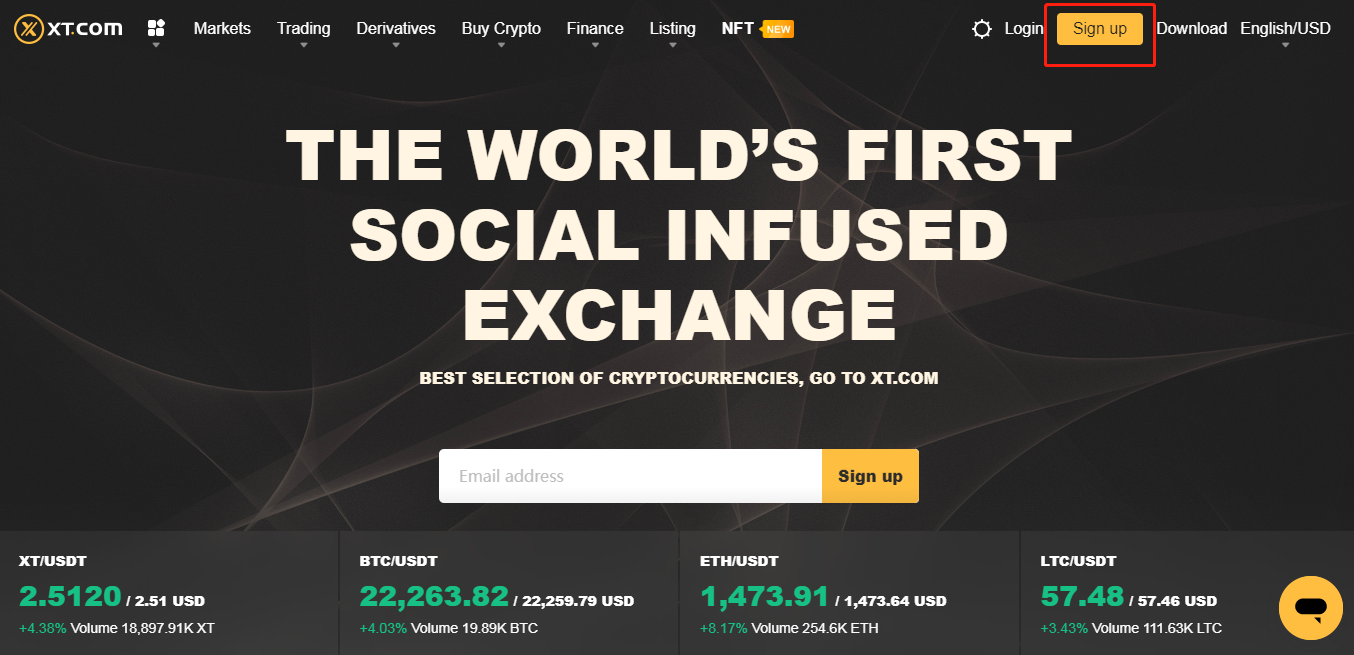
1. In order to Log in to XT.COM, you’ll need to go to the official homepage of the XT website and click [Sign up] on the upper right corner.
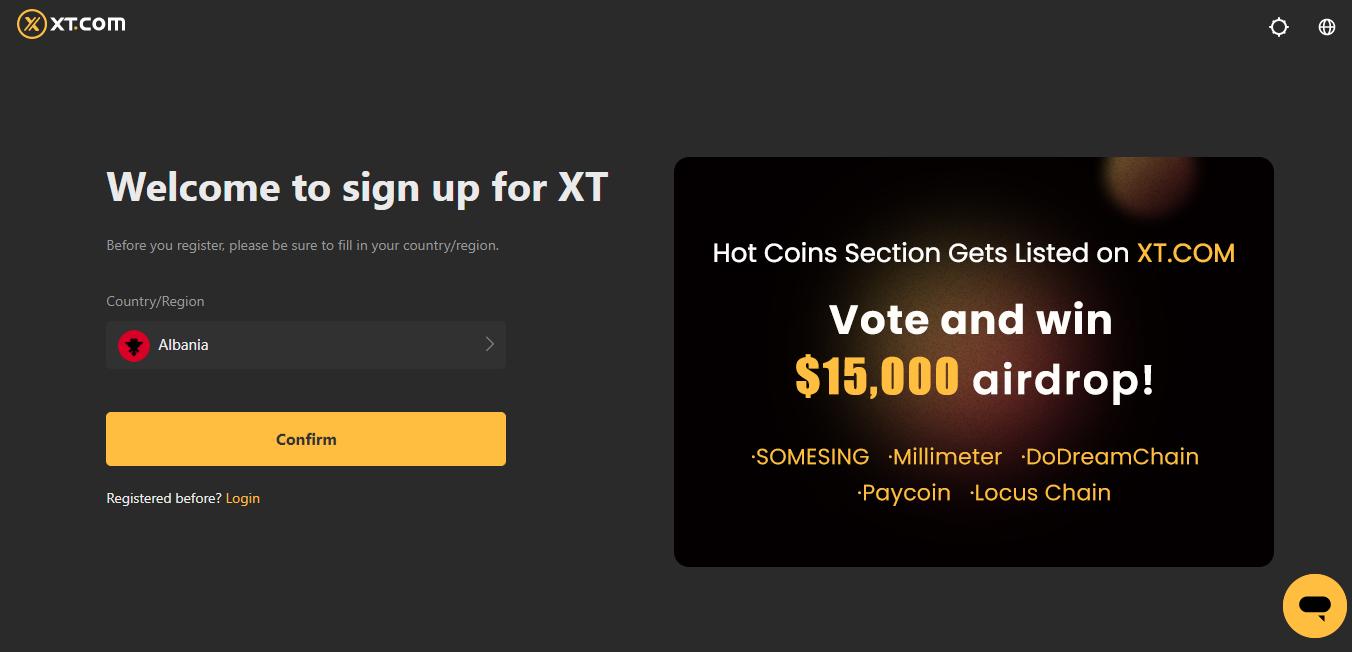
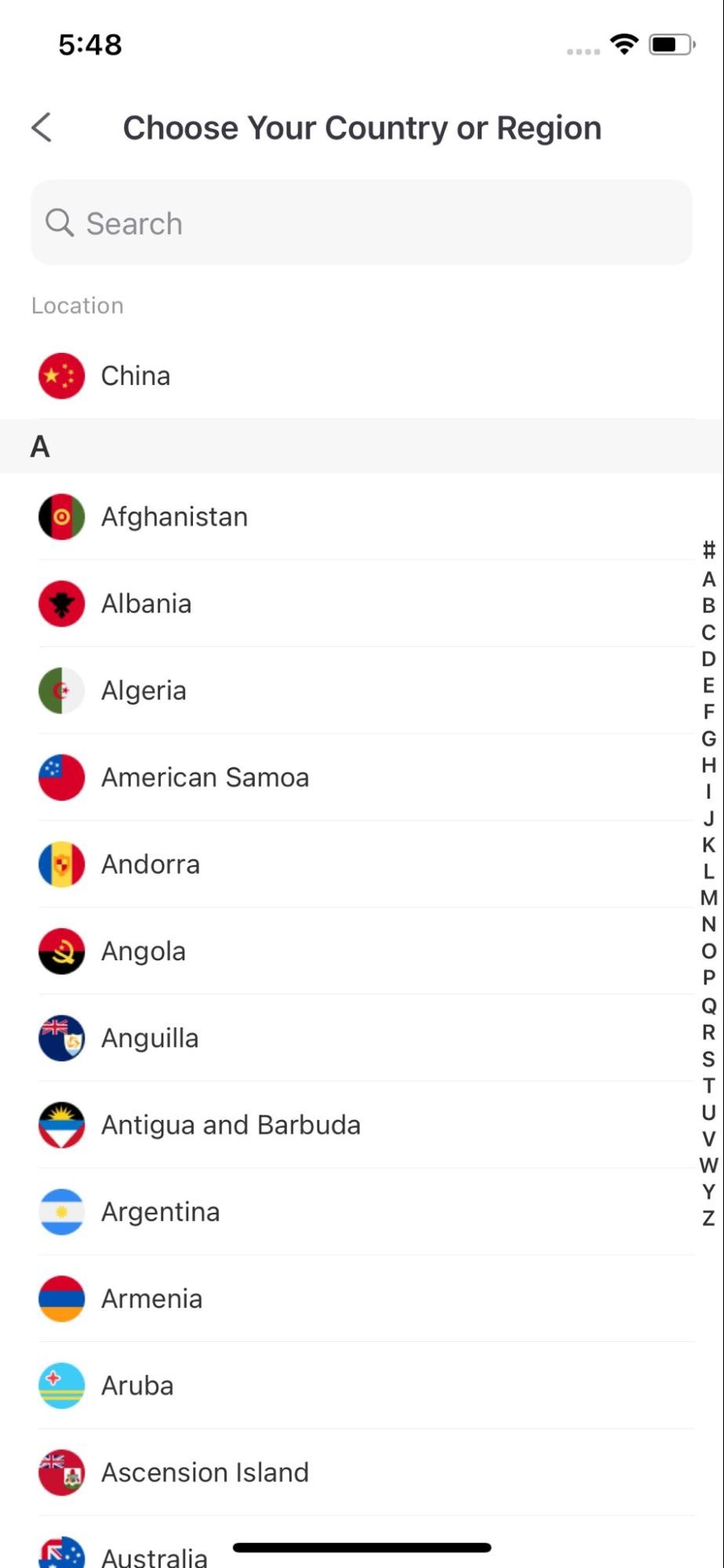
2. You’ll then be prompted to fill in your Country/Region.
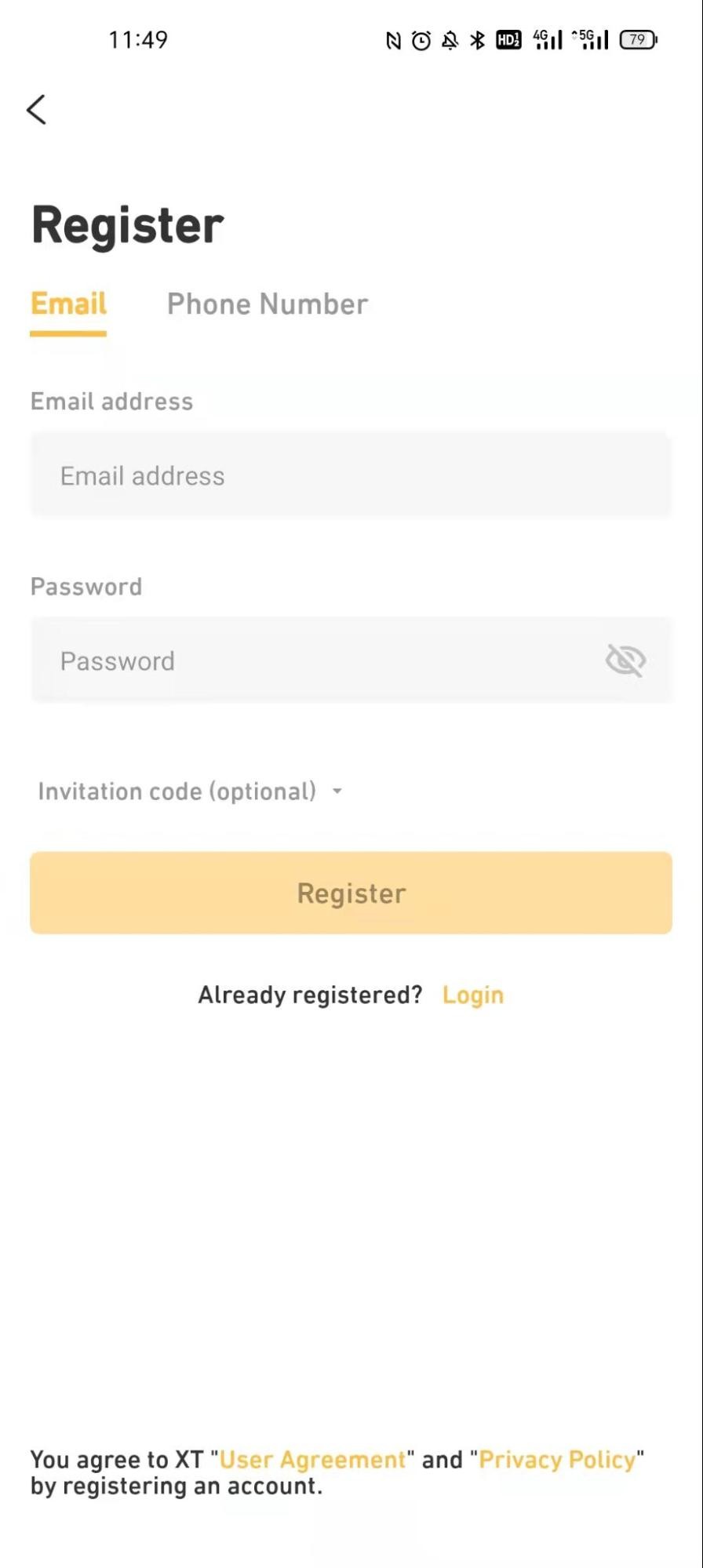
3.After selecting the correct Country/Region, you can choose to sign up by email or phone. After entering your email/phone number and password, click the "Sign up" button at the bottom.

Sign up for XT account on phone
1. Open the XT App, go to the homepage, and click on the [Me] icon on the upper left corner of your screen.

2. You’ll then be brought to the [Login/Sign up] page. Please click on "Sign up" and you’ll be brought to the registration page. Just like the desktop sign up process, you can choose to sign up by email or phone number. Enter the required information. (Note: Please be sure to select your country prior to KYC verification.)

KYC Process
Step 1:
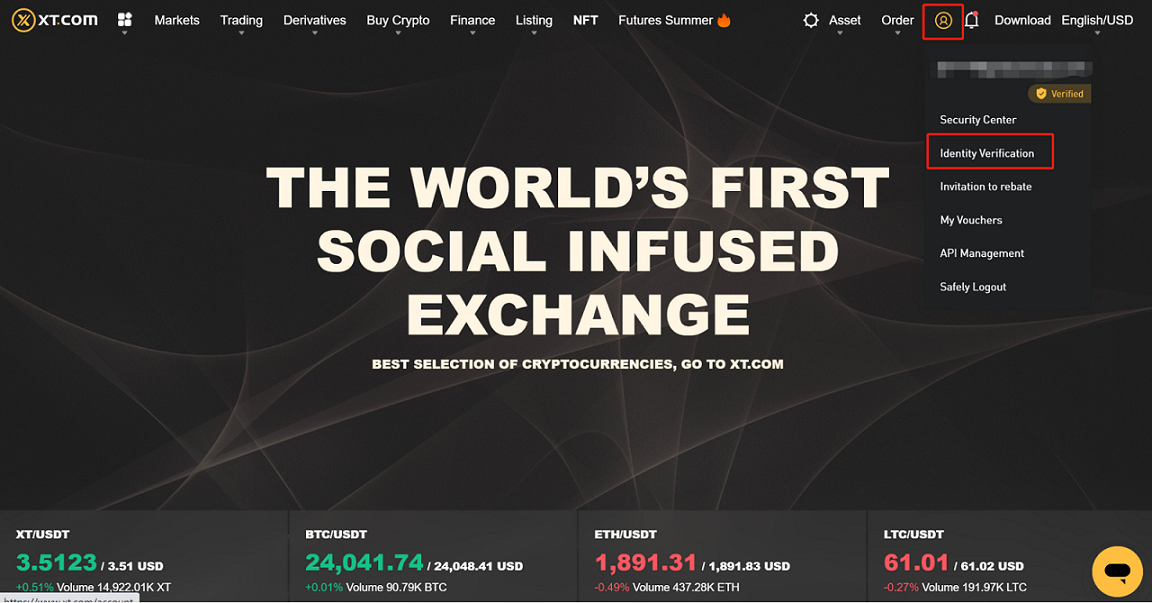
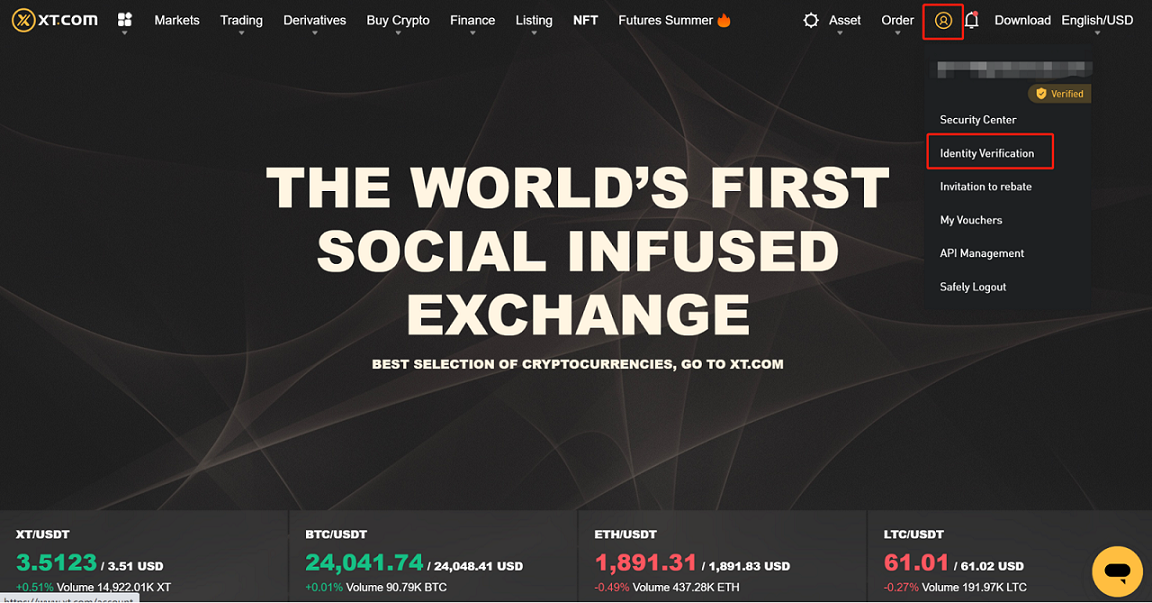
Go to the official site www.xt.com, login to your account, click on the right top corner [my account], and then click on [Identification].
Step2:
The identification page is divided into basic verification and advanced verification. This determines the transaction limit of yourXT.COM account. If you need to increase your limit, you will need to complete the advanced verification.(Note: Please be sure to select your country prior to KYC verification.)

Step 3:
LV1 Basic Verification:
1. Click the yellow “Verify Now” button in LV1 Basic Verification section. Enter your Nationality - Name - Date of Birth - ID Type in the pop-up box, and click “Continue” after confirming all the entered data is correct.
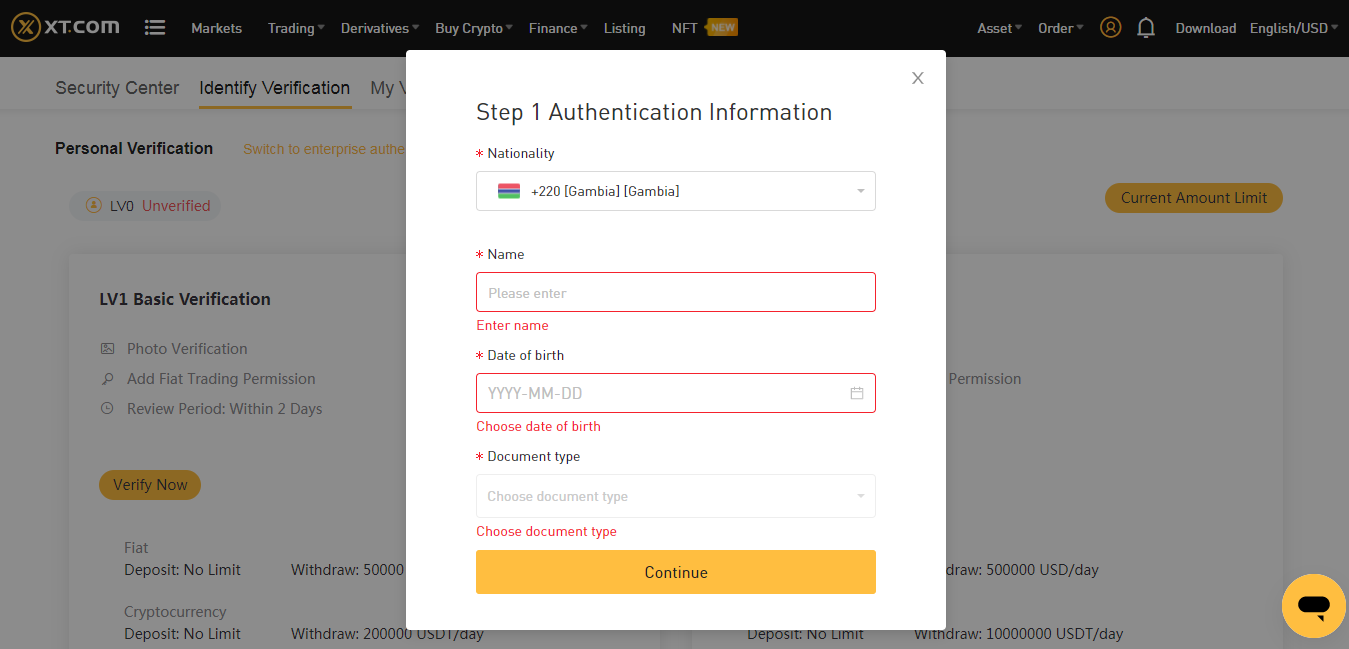
2. Choose a method for the verification process shown in the pop-up box (ex. your ID card).

• Choose Photo Verification (if your PC has a camera).
Click “Take Photo” - “Begin Verification” - “Send Link via Email” (upload ID as prompted in the email) or scan the QR code instead.
• Choose App Verification (if your PC doesn’t have a camera).
Click App Verification — use the XT app to scan the QR code — follow the example pictures below to upload your ID (1. Take a photo of your ID; 2. Take a selfie) - After Face Verification is completed, you will be notified by email - After the app verification process is completed, click “I have completed the verification on phone” on the website.


(Note: 1. The method above only applies for those using XT app version v3.8 and above; 2. iOS system version v11.0 and above. Please update your app if you have an older version to successfully complete your KYC with your XT.COM app)
Step 4:
Please be patient once you’ve completed the KYC process in step 3. XT.COM will review your information as soon as possible. Once you have passed the verification, XT.COM will send you an email notification.
Note: During this stage of application, please do not refresh your browser. You may apply for identity verification up to 5 times per day. If your application is rejected 5 times within 24 hours, please be patient and try again after another 24 hours
LV2 Advanced Verification:
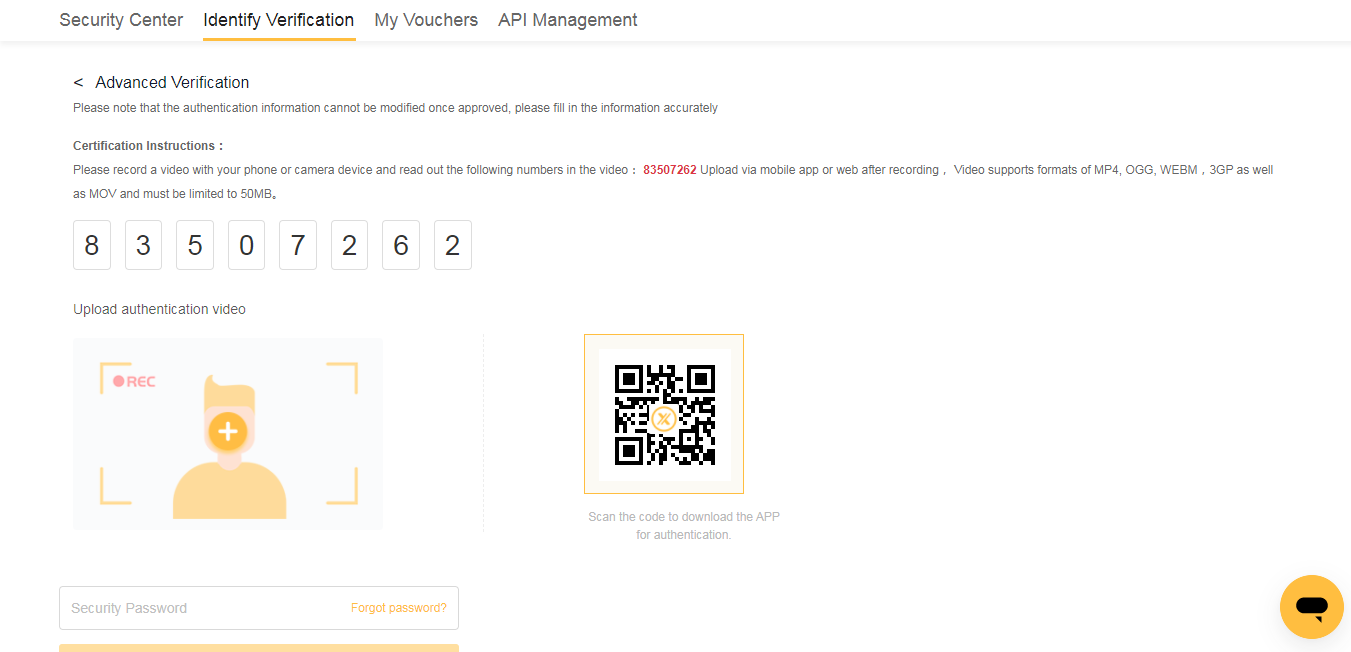
Use a mobile phone or camera device to record a video, and read the numbers provided on the page when taking the video. Upload the video after completion, enter security password, and click submit. Only video formats of MP4, OGG, WEBM, 3GP, MOV and under 50MB are supported. (Please be patient and wait for the staff to review. Remember to check whether the account information is passed or not in time.)
Phone app identity verification:
Step 1:
Login to the XT.COM phone APP, then click on [Real name verification].

Step2:
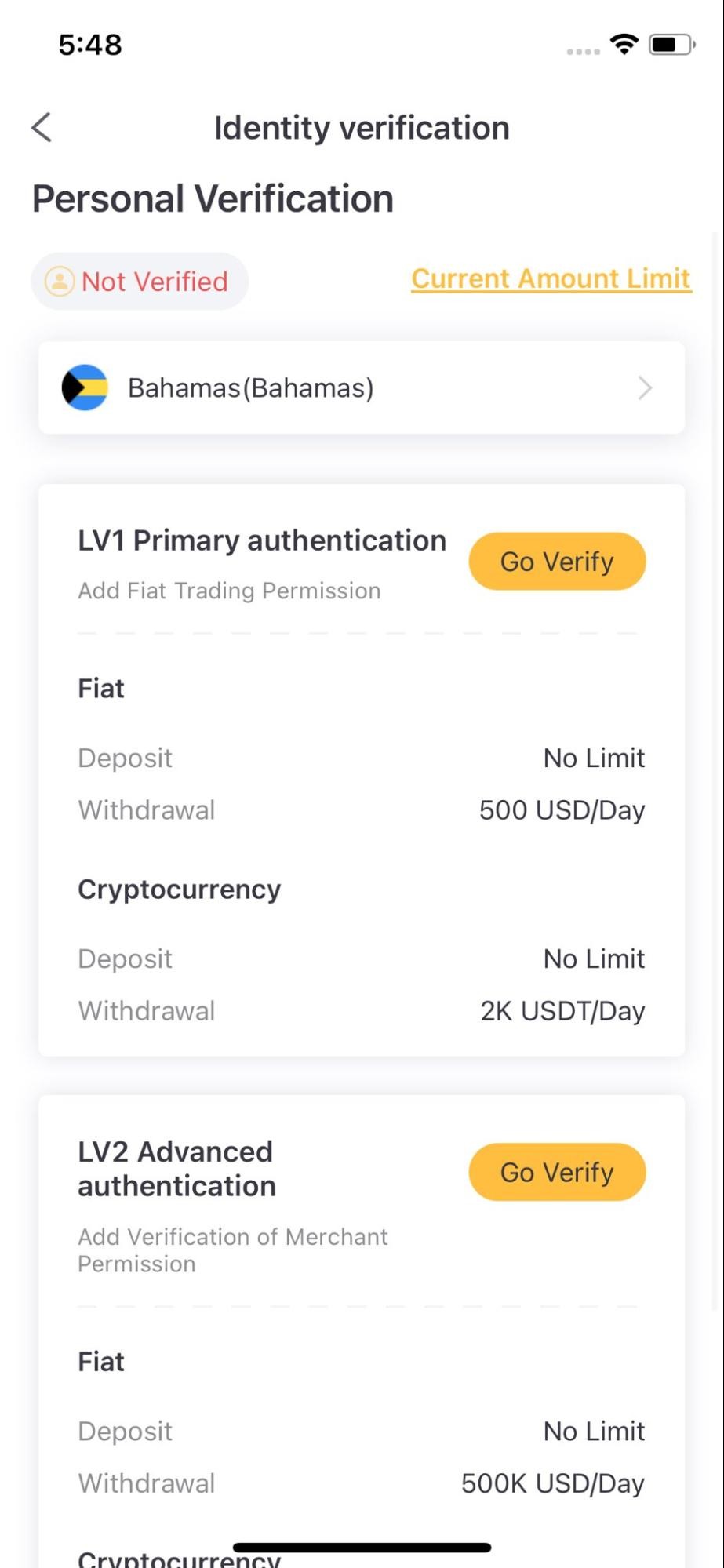
The identification page is divided into basic verification and advanced verification. This determines the transaction limit of your XT.COM account. If you need to increase the limit, you can complete the advanced verification.(Note: Please be sure to select your country prior to KYC verification.)
Step 3:
LV1 Basic verification:
1. Click on “Verify Now” in LV1 Basic Verification section. Enter your Nationality - Name - Date of Birth - ID Type in the pop-up box, and click “Continue” after confirming that the entered data is all correct.

2. After clicking “Confirm”, upload a picture according to the example shown in the APP, then click “Next”, and perform the verification process in two stages (1. Take a photo of your ID card; 2. Take a selfie). After Face Verification is completed, you will receive a notification by email.
Note: Please follow the prompts when conducting face verification. Please do not wear hats, glasses or use filters. Make sure that the shooting environment is well-lit.

3. Please be patient after completing the above process. XT.COM will review your information as soon as possible. Once you have passed the verification, we will send you an email notification.
Note: During this stage of application, please do not refresh your browser. You may apply for identity verification up to 5 times per day. If your application is rejected 5 times within 24 hours, please be patient and try again after another 24 hours
LV2 advanced verification:
Read the numbers provided on the page when taking the video and upload the video after completion for review. Please wait patiently for staff to review and check the account information for your outcome.

How to do Spot Trading on XT.COM
Website operation guide:
Step 1:
Enter the official website www.xt.com and log in to your XT.COM account.
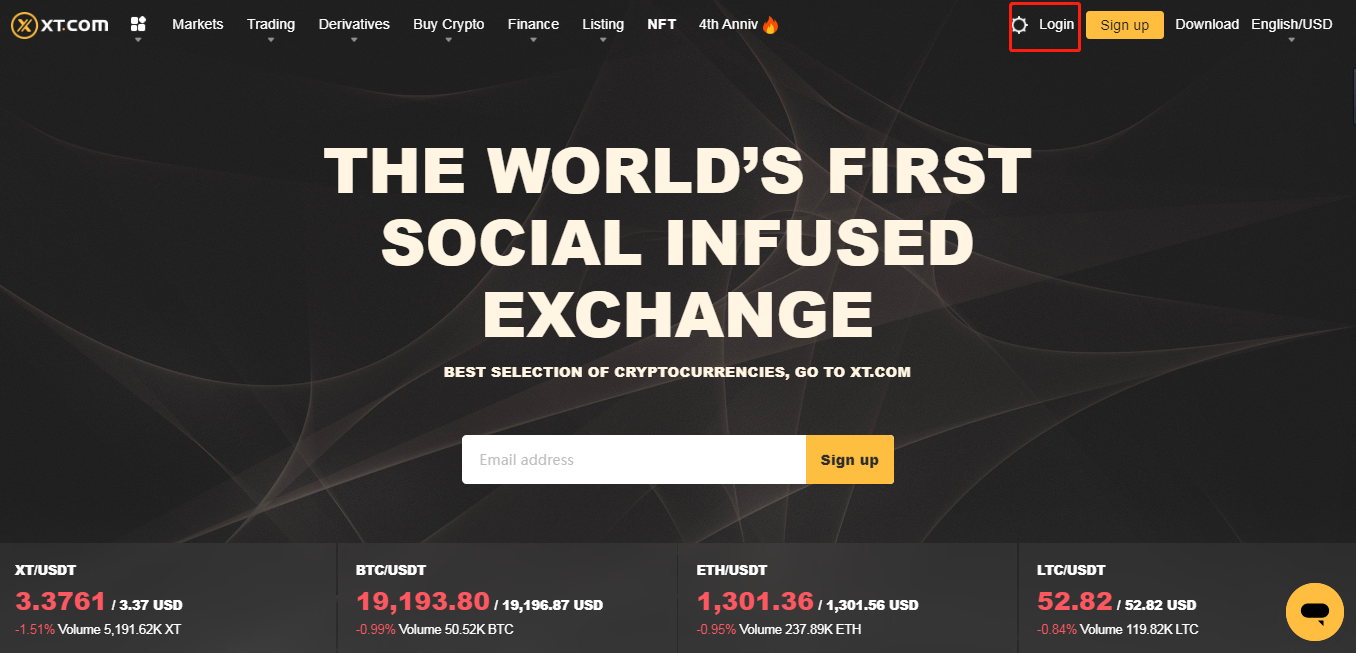
Step 2:
Click the token name on the page to head over to its spot trading page.

Transaction page:

- 24-hour transaction information of the current trading pair
- K-line and market depth display area
- Current order record
- Selling orders
- Buying orders
- Latest transaction price
- Buying order area
- Selling order area
Step 3:
Select the order area (standard or professional version) of the trading center, refer to the price in the buying and selling area on the left, enter your preferred XT purchase price and amount, and click “Buy XT” to complete the purchase. The same applies for a sell order.

Note:
- The price in the order area always shows the latest transaction price for limit orders. If you want to make an instant transaction, you can choose [Market Trade] instead.
- If the current market price of XT/USDT is 3.5 and you want to limit your purchase price to 3, you can choose [Limit Trade] instead.
- The percentage bar below the amount shown refers to what percentage of your total USDT assets will you need to buy XT.
Mobile app operation guide:
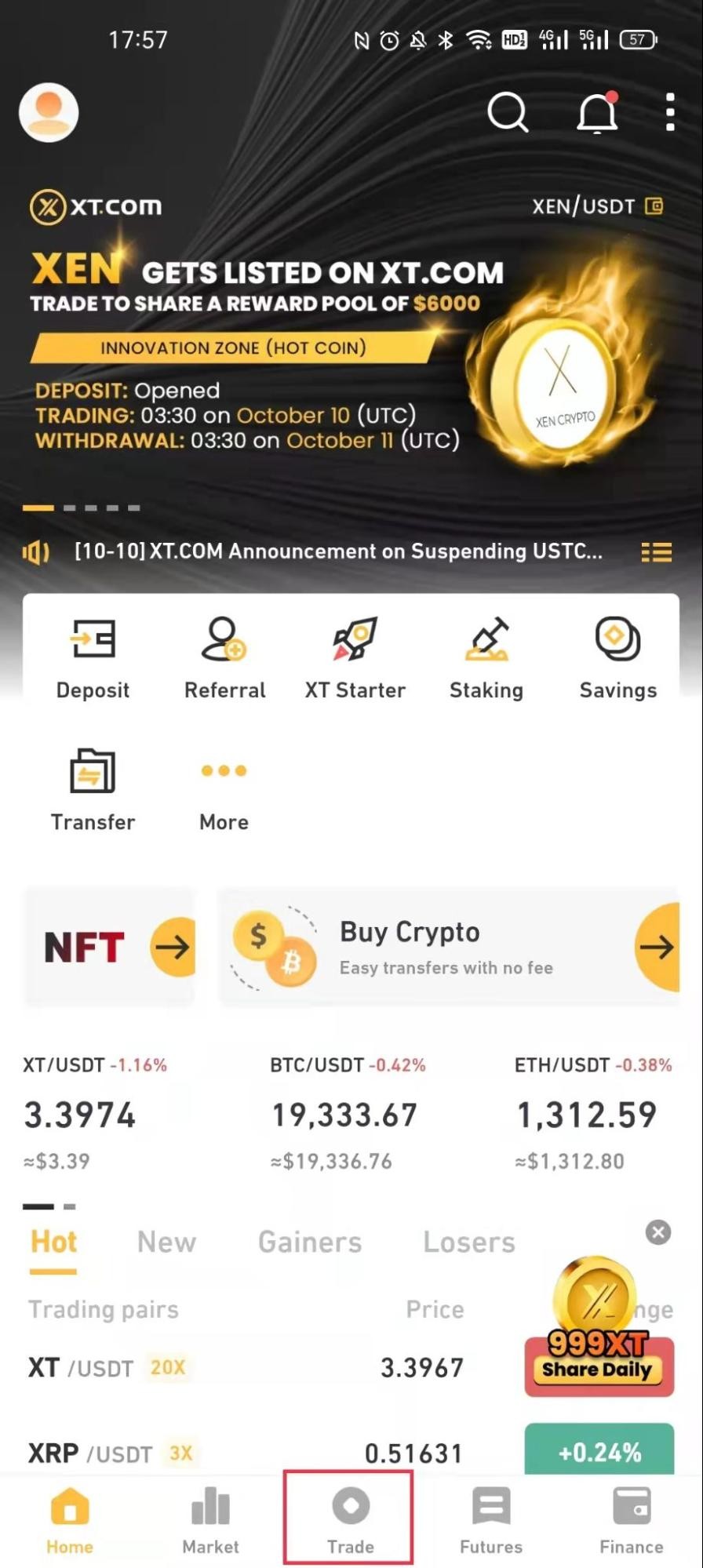
Step 1:
Log in to the XT app and click [Trade] to enter the spot trading page.
Transaction page:
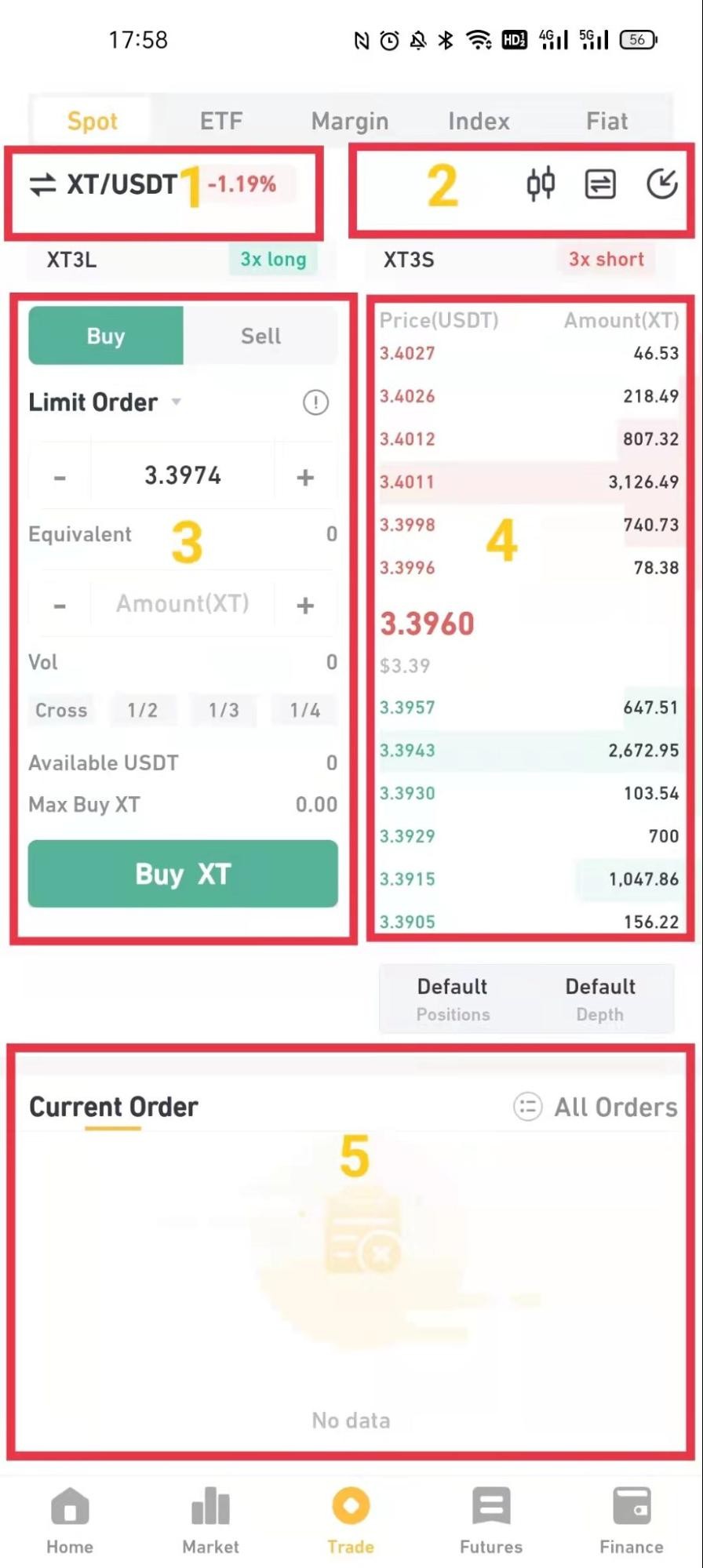
- Other trading market/trading pair switching area
- Real-time K-line chart, fund transfer, deposit
- Buying order area and selling order area
- Selling order and buying order
- Current order record
Step 2:
Enter the order area of the trading center, refer to the price in the buying and selling area on the left, enter the appropriate XT purchase price and amount, and click “Buy XT” to complete the purchase. (Same for selling order).
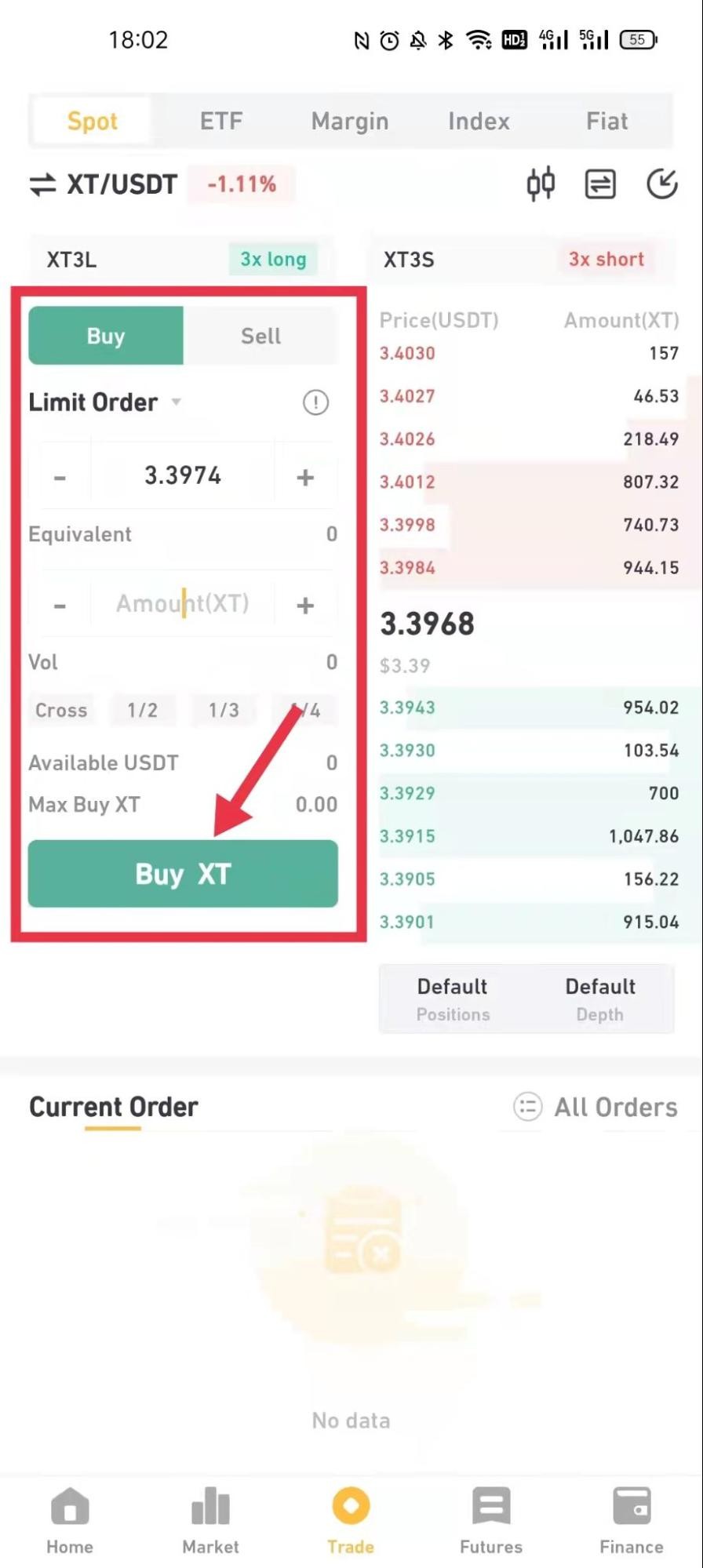
Note:
- The price in the order area defaults to the latest transaction price of the limit price. If you want to make a quick transaction, you can choose [Market Order].
- If the current market price of XT/USDT is 3.5, and you want to limit the purchase price to 3, you can choose [Limit Order].
- The percentage bar below the amount refers to what percentage of your total USDT assets will you use to buy XT.
How to make a Deposit and Withdrawal on XT.COM
How to make a Deposit?
If you already have digital currency assets, you can use the deposit function from your other trading platform or wallet to transfer digital currency into your XT account.
Digital currency can be deposited through “Address". How to find the deposit address of your XT platform? You will find [Deposit] under your "Wallet Account", simply copy the address of your XT platform to the deposit platform to operate and deposit your digital assets into the XT spot account.
Please refer to the following steps and pay attention to the following points:
1. Log in to the XT official site. After you have successfully logged into your account, click on the upper right [Asset]→[Wallet].
2. Enter the [Wallet] page.
Here is a Bitcoin (BTC) example to illustrate the corresponding deposit steps.
3. After entering the digital currency BTC, click on BTC "Deposit" and choose the corresponding chain name of the currency you want to deposit. Click on the chain to obtain the corresponding deposit address.

Chain Selection Tips:
- ERC20 is the blockchain for the operation of smart contracts in Ethereum, and the coin is ETH.
- TRC20 is the standard for the operation of smart contracts in the TRON network, similar to the ERC-20 standard.
- BEP20 is the blockchain of the Binance Smart Chain (BSC). The Binance Smart Chain is a decentralized blockchain launched by Binance. The coin on this chain is BNB.
- BTC refers to the Bitcoin blockchain, which is a point-to-point electronic cash system.
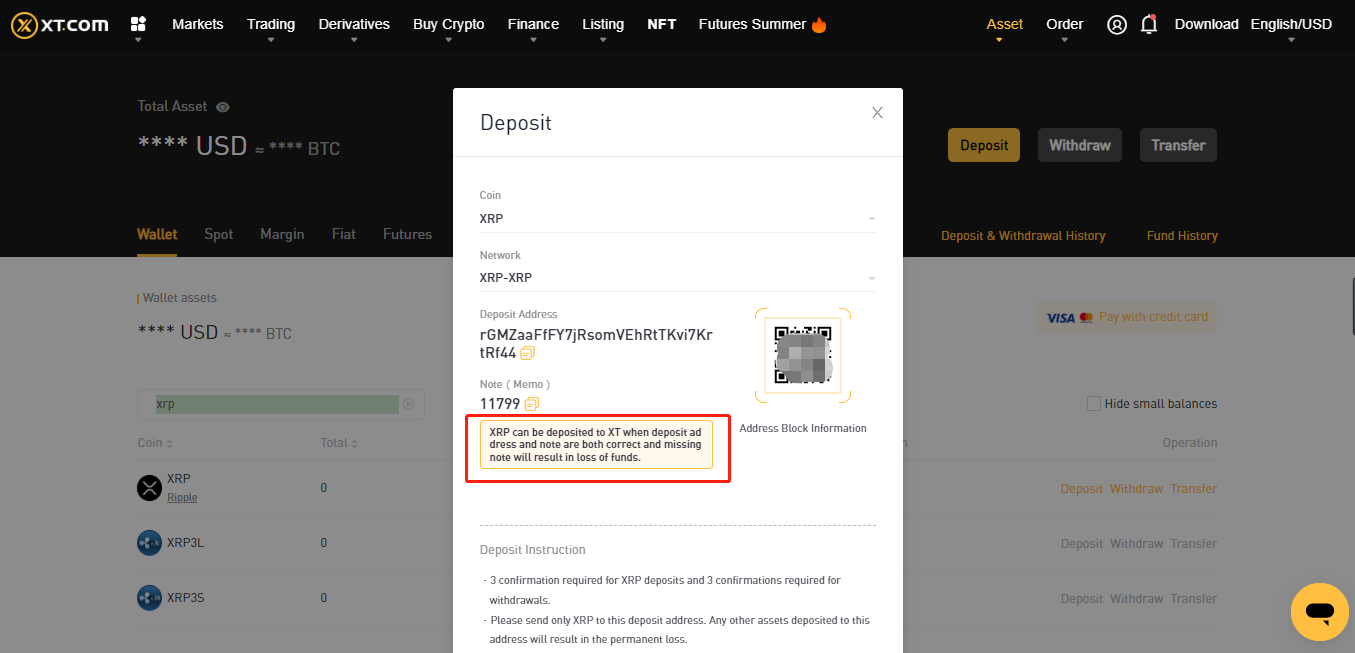
4.Note: If you choose to deposit certain digital currency (such as XRP, etc.), you will see the prompt of "Memo to fill in correctly at the same time". Please note that you need to copy your deposit address and provide "Remarks Address (Memo)". (If you don’t fill in the Memo or fill it in incorrectly, your assets will not be recovered.)
FAQ:
1.Why is it required to fill in the Remarks (Memo) for some digital currencies?
This is because under some main chains, the chain address is universal. Hence, everyone’s main chain address is the same. Only by filling in the Remarks(Memo), the user’s transaction can be identified.
2.When will the digital currency deposit arrive? What is the handling fee?
The deposit time and handling fee are related to the main network you choose. Take USDT as an example: XT platform is compatible with 8 mainnet deposits: ERC20, TRC20, BSC, POLYGON, FIO, XSC, METIS and HECO. You can select the mainnet on the withdrawal platform, enter your deposit amount, and check the deposit fee.
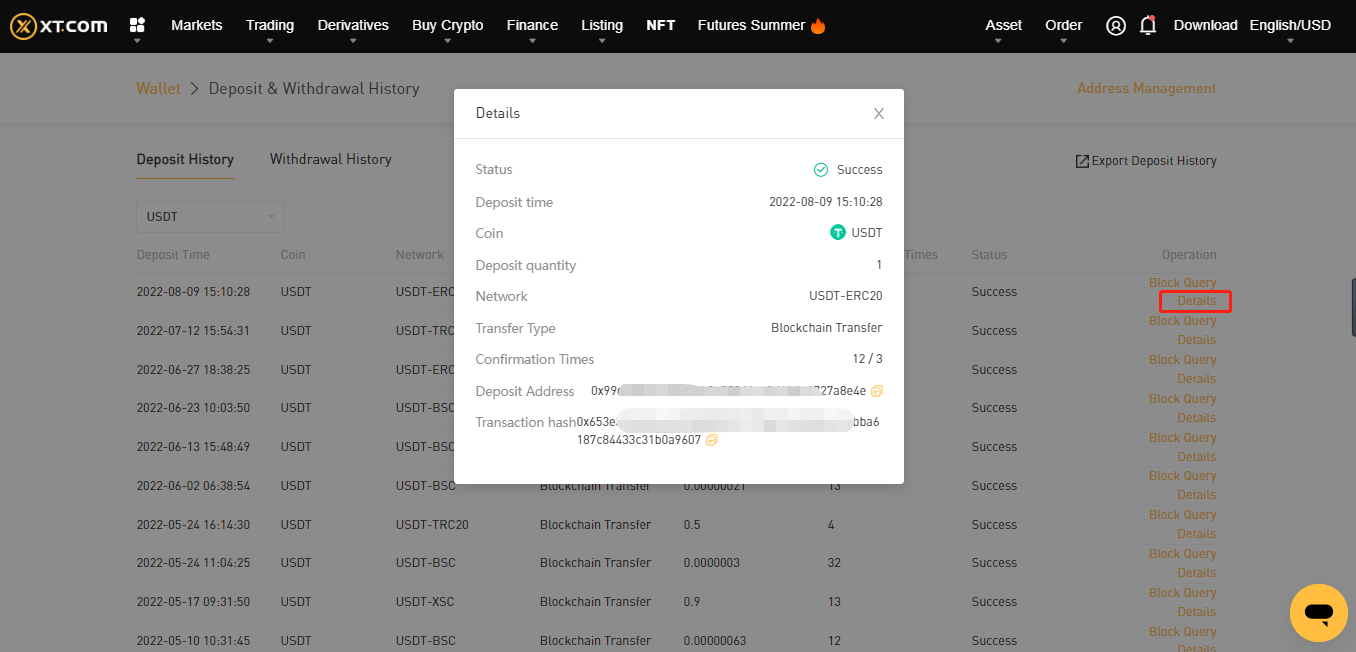
If you choose TRC20, you need 3 network confirmations; in another case, if you choose the ERC20 chain, you need all 12 networks under the main chain to be confirmed before you complete the deposit. If you do not receive your digital assets after the deposit, it may be that your transaction has not been completed for the network confirmation of block trading, please wait patiently. Or check the transaction completion status in your deposit record.
*Note: If your deposit address is wrong, or you choose a chain deposit that does not support that currency, you will not be able to retrieve your digital assets. Be sure to verify your deposit information and operate carefully.
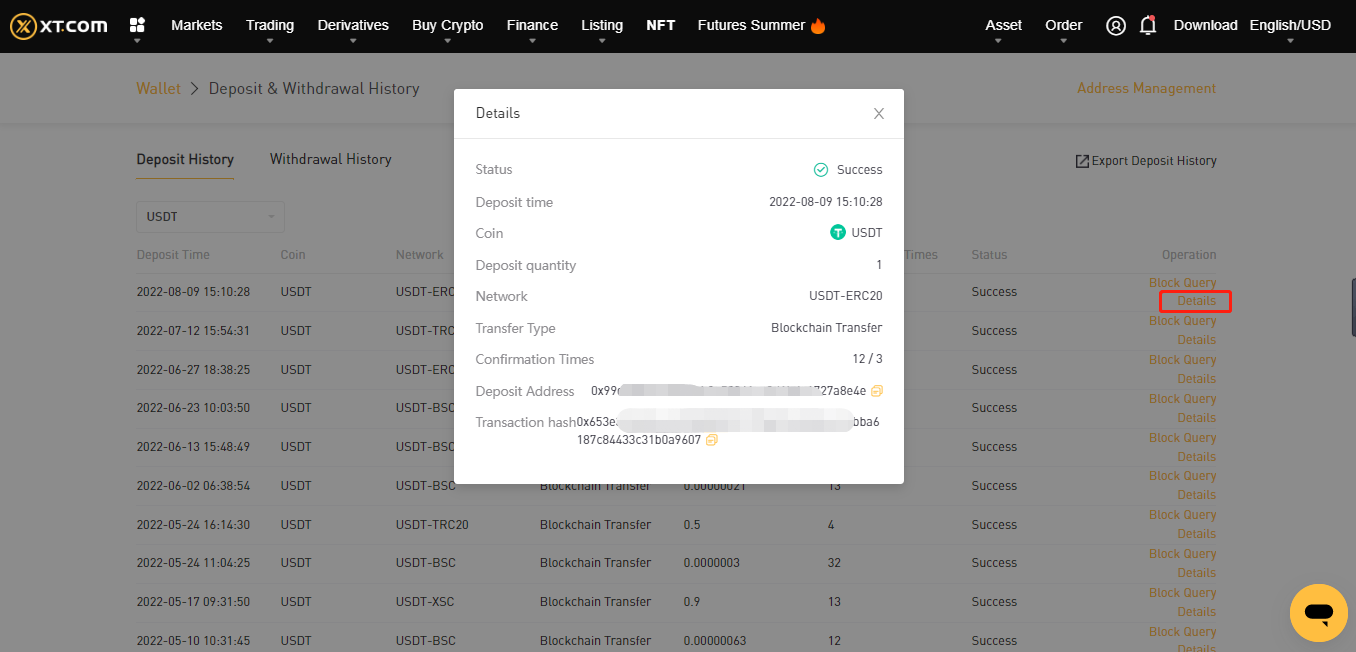
After successfully deposited, click [Wallet Account]-[Deposit and Withdrawal History]-[Deposit History], enter the details to view the deposit.
In addition, if you have not held digital assets before, you may click on [Buy Crypto] on the top column, and proceed to [Third party-payment] to make a purchase.

How to make a Withdrawal?
If you wish to withdraw the crypto assets in your XT account to another platform or your digital wallet, you can simply perform it through the [Asset]-[Wallet Account] function.
Crypto assets can be withdrawn through "address". Before you withdraw, you need to find the deposit address on the corresponding platform and copy the address to the XT platform's ‘withdrawal address’ to deposit your assets to the corresponding platform's account.
1.Log into XT Official site. Click on the upper right [Asset]→[Wallet Account].
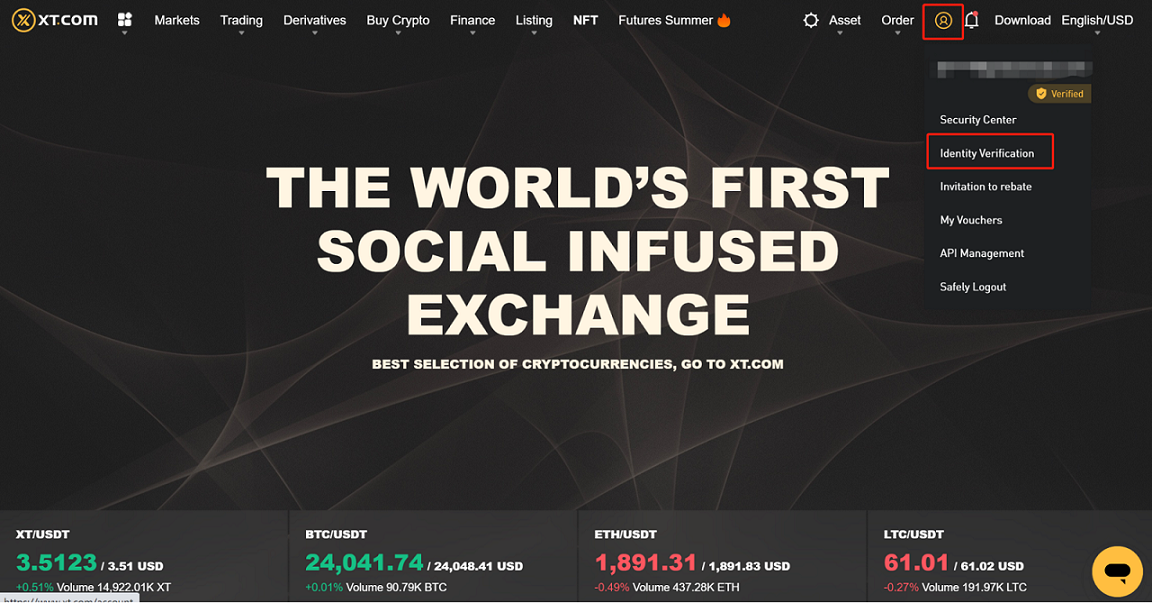
2.Select or search for the coin you wish to withdraw, click on the corresponding coin [Withdraw] button.
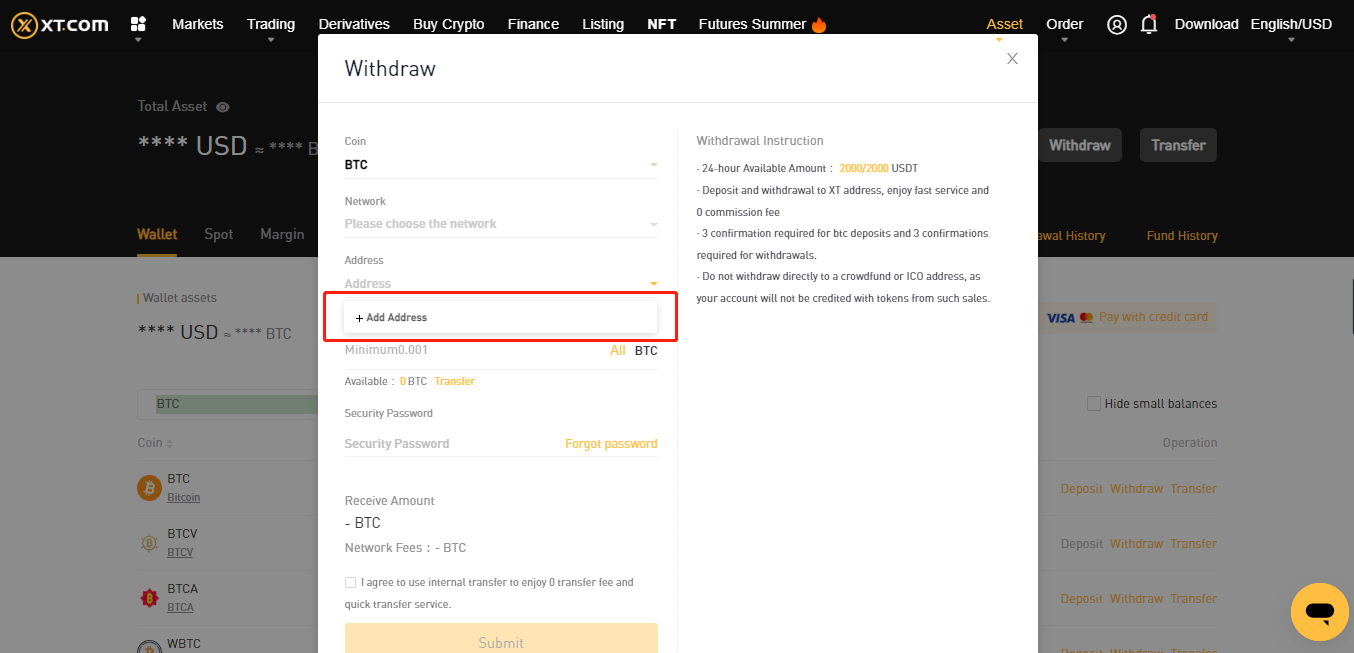
Here is a Bitcoin (BTC) example to illustrate the corresponding steps for withdrawal.
- Click on ‘Add Address’, enter the relevant information, then click on ‘Submit’ to add the address successfully.
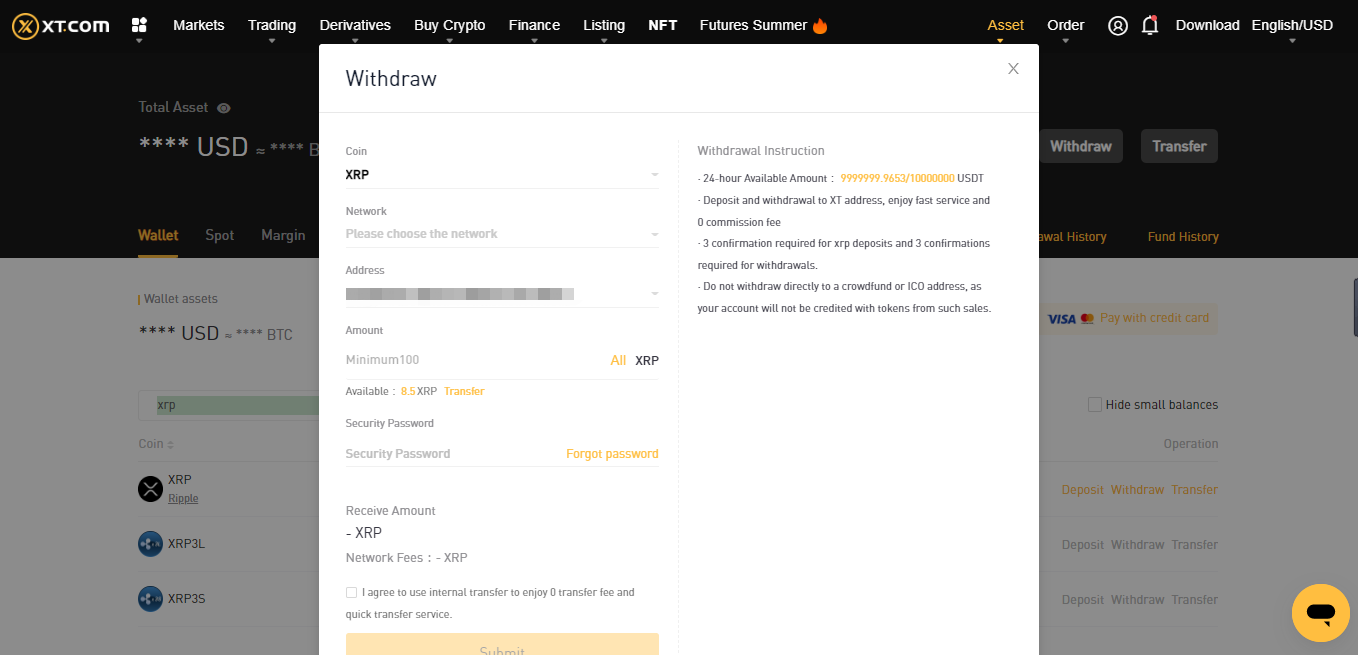
- Once the address is successfully added, return to the previous page, click “Withdraw”, then enter the withdrawal page. Select the added withdrawal address, enter the quantity and security password of the withdrawal, then click ‘submit’ to complete the withdrawal application. (The system will automatically calculate the handling fee and will show the total amount received in the corresponding account; the total amount received in the corresponding account = the amount of coins withdrawn-the handling fee)

Note:
- If you choose BTC, please make sure that the coin you choose on the corresponding platform is also BTC;
- If you wish to transfer to another platform, please fill in the BTC deposit address of the other platform (similar to a bank transfer, you need to fill in the other party’s card number, and in this case you are filling in the other party’s ‘deposit address’ in the ‘withdrawal address’ );
- If you are withdrawing the Cryptocurrency to a wallet: you need to open the recipient wallet, click on the deposit, and get the deposit address of the corresponding coin;
- When you enter the withdrawal address, if there are multiple chains, please confirm with the platform/wallet of the deposit address and select the corresponding chain to avoid a situation where the coin can not be received due to the wrong chain selection.
- If you do not complete personal identification for your account, your quota will be limited. You may view your current quota by clicking here .
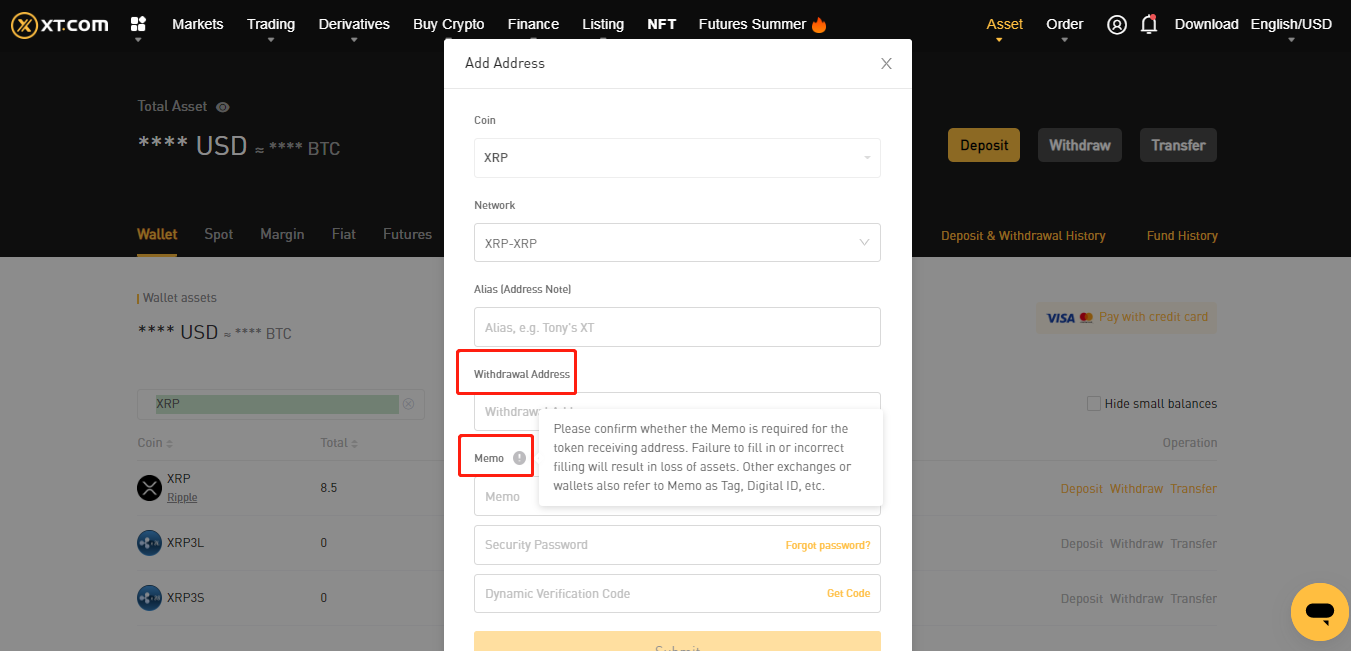
3.Certain currencies not only need the correct withdrawal address, but also need a Memo. Let’s take XRP as an example, you need to fill in both the "XRP deposit address" and "XRP Memo" transferred to the corresponding platform. (Due to different translations, Memo will be displayed as a label, Tag, or digital ID on some platforms)
Then conduct a safety verification. Click on [Get the verification code] and enter the verification code via your mobile phone or email. The verification code is valid for 30 minutes. Please check and enter in time.
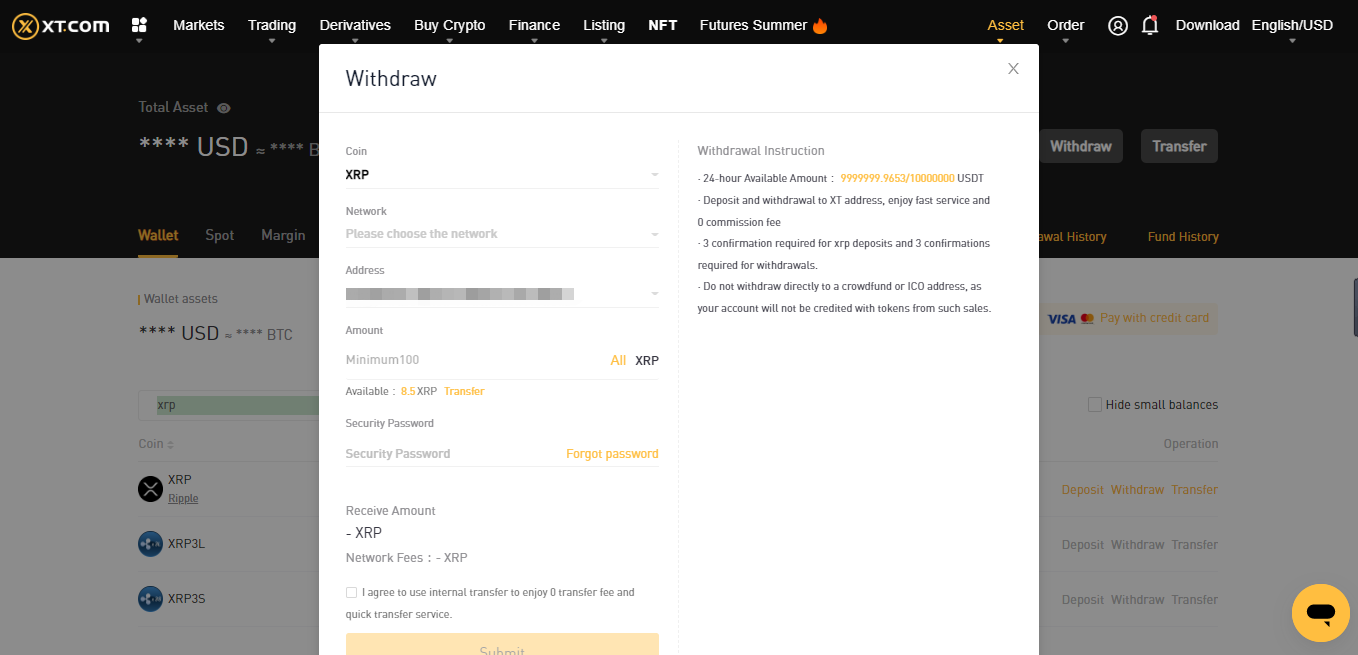
4.After adding the withdrawal address, return to the previous page. Verify the coin you wish to withdraw, withdrawal address, withdrawal amount, etc.. Make sure that everything is correct, enter the security password, and submit.
5.After successfully withdrawing, click [Wallet Account]-[Deposit and Withdrawal History]-[Withdrawal History], enter the details to view the withdrawal.
If you have any questions, please check XT.COM’s announcement center.
Conclusion
XT.COM trading exchange is built from a desire to give everyone access to digital assets regardless of where you are. By consistently expanding its ecosystem, XT.COM is dedicated to providing users with the most secure, trusted, and hassle-free digital asset trading services.
As the world’s first social-infused digital assets trading platform, XT.COM also supports social networking platform based transactions to make crypto services even more accessible. Furthermore, to ensure optimal data integrity and security, XT.COM sees user security as its top priority.